Phantom Syren
A downloadable tool for Windows
Product description
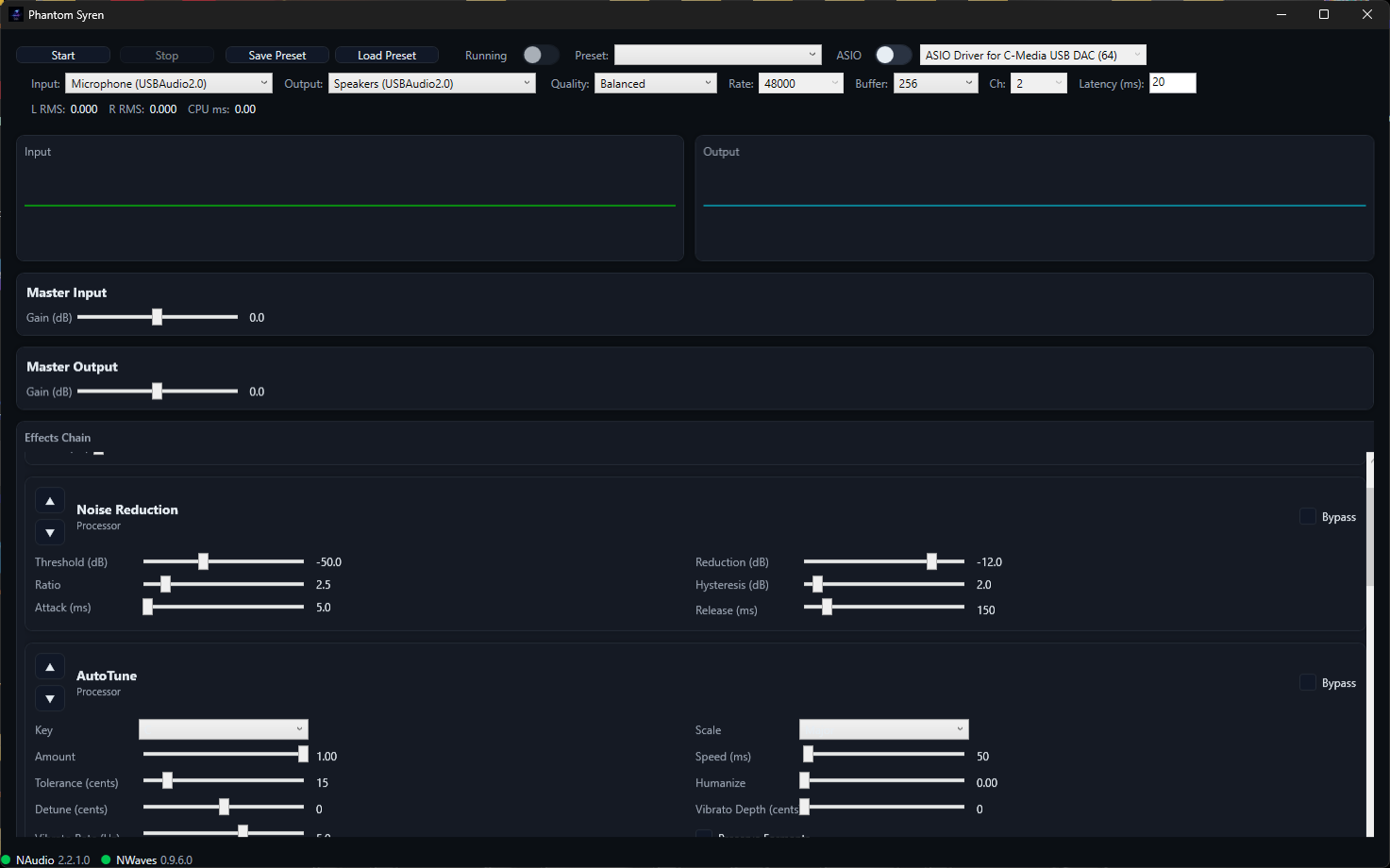
Phantom Syren is a low-latency, real-time vocal processing console for Windows. It lets streamers, podcasters, and vocalists monitor their voice live through a customizable chain of studio effects, with intuitive controls, responsive meters, and flexible device/back-end options. The app focuses on stable performance, smooth parameter editing, and practical presets that get you sounding great immediately.
Who it’s for
- - Streamers and creators who need polished vocals in real time
- Podcasters and broadcasters looking for consistent, radio-ready tone
- Vocalists who want live monitoring with a compact, reliable effects chain
What's New in 2025.1.0
- -Engine and performance enhancements
- -Rebuilt Autotune effect from ground up to fix persistent popping bug
- - Eliminate per-buffer allocations via buffer pooling and Span-based processing
- - Lock-free queues for parameter updates; apply at buffer boundaries
- - Optional WASAPI Exclusive mode and buffer negotiation
- - Chain management
- - Drag-and-drop effect reorder
- - Atomic graph swap at buffer boundaries for glitch-free updates
- - VST2 hosting for adding your favorite plugins
- - Collapsible effect cards, virtualization for large chains
- -Simultaneous Pre/Post Effects Chain recording to .wav file and playback
- Adopted a year based versioning system formatted as such: Year.Major.Minor
Key features (current)
- - Real-time engine
- WASAPI shared mode with configurable output latency
- Optional ASIO backend (InitRecordAndPlayback) for minimal latency
- IEEE float 32 and PCM16 capture support, processing in float
- Adjustable SampleRate, BufferSize, Channels, and output latency (WASAPI)
- Quality presets (Low Latency, Balanced, High Quality) for quick setup
- Device and backend selection
- Toggle between ASIO and WASAPI
- ASIO driver picker when ASIO is enabled
- WASAPI input/output device selection when ASIO is disabled
- Flexible effects chain
- Master Input and Master Output gain blocks
- Built-in processors with dedicated parameter editors and bypass
- High-pass filter
- Noise reduction / gate
- Pitch correction (key/scale, amount, speed, tolerance, humanize, vibrato, formants)
- Equalizer (3-band)
- Compressor (threshold, ratio, attack, release, makeup)
- Distortion/saturation (drive, tone, mix, hard-clip)
- Chorus/doubler
- Tremolo
- Delay (ping-pong)
- Reverb (room, damping, width, predelay)
- Low-pass filter
- Limiter (ceiling, release)
- Reorder with Move Up/Down controls
- Presets and persistence
- Built-in chain presets (e.g., Podcast, Rock, Pop Tight, EDM Lead, ASMR, LoFi)
- Save and load custom chain presets to JSON including parameters and master gains
- Live metering and visualization
- Left and right RMS meters with CPU processing time per buffer
- Input and output waveform previews updated ~30 FPS
- Responsive UI
- WPF + MVVM with a compact, wrap-friendly top bar
- Themed appearance and accessible standard controls
Technical specifications
- - Platform: Windows (WPF, .NET VB)
- Audio stack: NAudio (WASAPI shared, ASIO)
- Sample rates: 44.1, 48, 96 kHz (selection depends on backend/device)
- Buffer sizes: 64 to 1024 frames (selection depends on backend/device)
- Channels: mono or stereo
- Preset format: JSON (type, name, bypass, parameters, master gains)
What makes it useful
- - Minimal setup: pick devices, a quality level, and a preset to get broadcast-ready sound fast
- Live-safe editing: parameters exposed with intuitive ranges to reduce zipper noise risk in practice
- Practical defaults: curated set of effects and presets tailored for spoken voice and lead vocals
- Transparent metering: see levels, CPU time, and waveform snapshots at a glance
Roadmap and next steps
- - Global bypass and per-effect solo (for auditioning)
- Metering and diagnostics
- Peak meters alongside RMS, per-effect gain reduction where applicable
- Backend and latency summary in status area
- Presets and sessions
- Versioned preset JSON with migrations
- Session save/load (full app state)
- Per-effect preset browser
- DSP improvements
- Parameter smoothing utilities across effects
- Optional oversampling for distortion-style effects
- Reverb quality modes
- I/O reliability
- Device hotplug resilience with seamless re-init
- ASIO channel mapping and format diagnostics
- UX and accessibility
- Enhanced keyboard navigation and screen reader naming
- Extensibility (research)
- Internal .NET effect plugin API
System requirements
- - Windows 10/11
- Audio interface or onboard audio compatible with WASAPI; ASIO driver optional for lowest latency
- .NET Desktop Runtime (version aligned with project target)
Getting started
- - Launch the app and choose ASIO or WASAPI
- Select your input (microphone) and output (headphones)
- Pick a Quality preset, then a built-in chain preset
- Click Start to monitor your processed voice in real time
- Fine-tune effect parameters, save your own preset when ready
Purchase
In order to download this tool you must purchase it at or above the minimum price of $29.99 USD. You will get access to the following files:
Download demo
Development log
- Phantom Syren 1.1.0 releasedSep 08, 2025
Comments
Log in with itch.io to leave a comment.
Hey Everyone,
Thanks for checking out my application. Please drop a comment telling us about the good, the bad, and the ugly of our app. It's very young and very much a work in progress, so you're feedback will be invaluable in making improvements. That said, please keep it respectful and constructive, Thanks.
-James